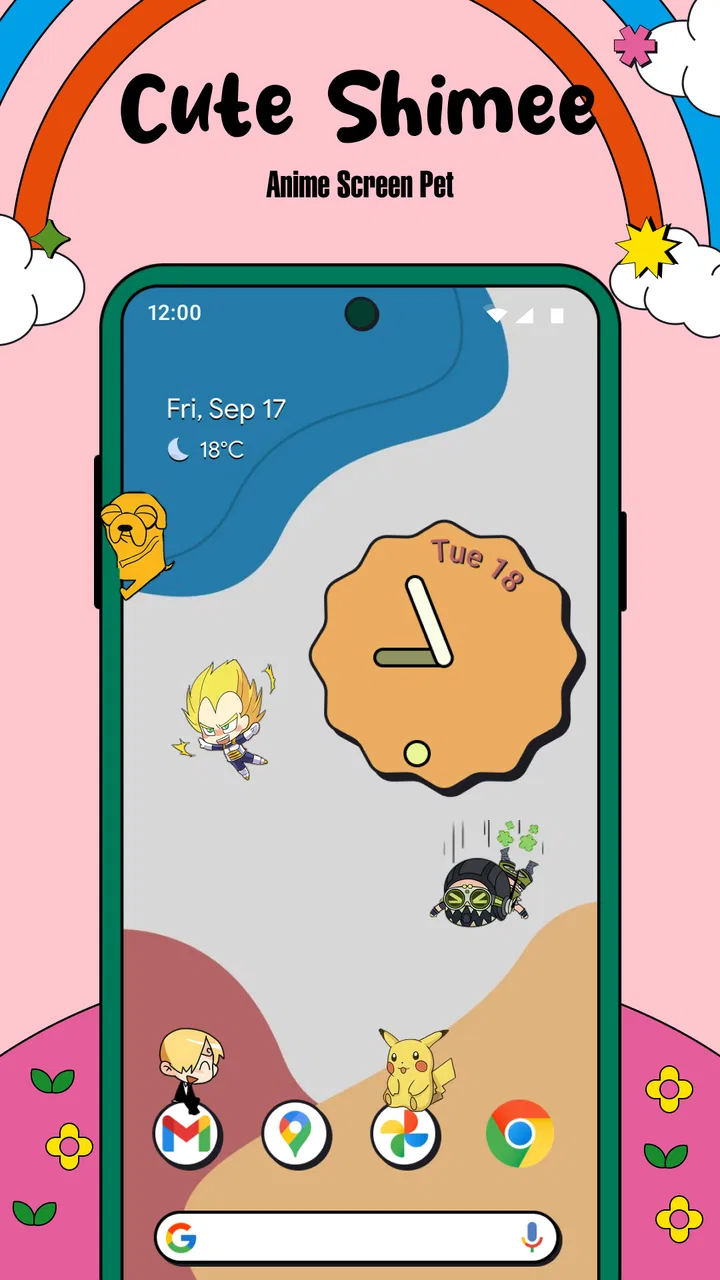
Cute Shimee: Anime Screen Pet
- 3.9
- Rating
- 500.00K
- Installs
- Free
- Price

 Analysis by App-foxy
I like personalization apps that add character without asking me to rebuild my whole phone around them. Cute Shimee: Anime Screen Pet takes that smaller, more playful approach by placing an anime-style companion on the screen. It is a free app from EDEO TECH LIMITED, listed for Everyone, and its appeal is easy to understand: instead of changing only a wallpaper or icon pack, it gives the display a little movement and personality.
After spending time with it, my impression is that this is best viewed as a light screen companion rather than a full customization suite or a game with a long-term progression system. The fun comes from having an adorable character appear during ordinary phone use, not from completing missions or managing a complicated virtual world. That distinction matters because it sets the right expectations from the beginning.
The app sits in the personalization category, where it competes with static wallpapers, animated backgrounds, widgets, and more elaborate virtual-pet products. Its strongest difference is the feeling of a character sharing the screen with me. That can make a familiar phone feel more personal, although it can also become distracting if I prefer a clean, quiet display.
You May Also Like

 Blood Strike: 2.5 Anniversary
Blood Strike’s Loadouts Turn Every Drop Into a Tactical Gamble
A close look at Blood Strike’s custom loadouts: how fast access to signature weapons reshapes its battle royale rhythm, rewards preparation, and narrows the gap between fights.

 Pandora - Music & Podcasts
Pandora’s Music Is Easy to Start, but Harder to Recover
Pandora’s strength is its low-effort path from a seed to a station. Its weak spot is how much confidence it asks you to place in connection, setup, and quiet recovery.

 8 Ball Pool
8 Ball Pool Is Built on Rivalries, Rematches, and Routine
A close look at the rivalries, rematches, shared routines, and unanswered safety questions that turn a quick pool match into a persistent mobile community.

 Samsung Music
Samsung Music’s Quiet Strength Is Playing What You Already Own
Its reach comes less from spectacle than from dependable access to a personal library. That simplicity is both the app’s strongest retention engine and its ceiling.

 AccuWeather: Weather Radar
AccuWeather Review: A Quick, Clear Forecast for Everyday Decisions
For everyday plans, the best forecast is the one you can understand quickly. AccuWeather makes rain timing, radar, and local conditions easy to act on, with a few trade-offs.

 Hill Climb Racing
Why Hill Climb Racing Still Turns Crashes Into One More Run
A tiny car, a bumpy hill and one more upgrade: Hill Climb Racing keeps resurfacing because its simple chaos makes every near-miss feel personal.
More From Our News Desk



How the screen pet fits into everyday phone use
I use a screen companion differently from a wallpaper: it becomes part of the moments between tasks, so I pay attention to whether it feels welcome when I unlock my phone and whether I can comfortably return to a quieter display. That everyday rhythm is a useful way to judge the experience before deciding how it fits alongside the rest of my phone setup.
A small companion rather than a replacement for the interface
The central idea is simple: an anime Shimeji pet lives visually on top of the normal phone experience. I can still use the device for messages, browsing, music, work, or navigation while the companion adds a decorative layer. That makes the app more immediate than a wallpaper, because the character feels present instead of being fixed behind icons.
In practice, this kind of personalization works best in short moments. I might notice the pet while checking a notification, waiting for a page to load, or taking a break from a task. Those small encounters are where the app earns its place. It does not need to dominate the screen to be enjoyable; in fact, the charm is stronger when it remains a background companion.
There is also a useful psychological trade-off here. A moving character can make a phone feel warmer and less sterile, especially for someone who enjoys anime-inspired design. At the same time, movement near text or controls can compete for attention. I would not recommend treating it as a productivity aid. If my goal is concentration, a static wallpaper or a plain home screen is usually the better choice.
What happens when connectivity becomes part of the experience
Connectivity deserves attention because an app like this may involve moments where content, setup, or other online-dependent behavior becomes relevant. I would not assume that every part of the experience works identically without a connection. The safest approach is to install and configure it while connected, then observe which parts remain available during the way I normally use my phone.
This matters particularly when I am traveling, using a limited mobile plan, or relying on an unstable public connection. A screen companion should feel effortless, so repeated loading or interruptions would quickly undermine the appeal. I would test it at home on Wi-Fi first, then briefly on mobile data, rather than discovering an unexpected limitation in the middle of a commute.
The connection question also changes how I judge the app against a wallpaper. A downloaded wallpaper is generally predictable once it is set. A character-based personalization app can feel more lively, but the setup or content experience may be less straightforward. For me, that makes Cute Shimee more interesting than a static image, but not automatically more dependable in every situation.
A realistic mobile scenario
Imagine checking a phone during a short coffee break. I open the device to answer a message, glance at a calendar reminder, and return to a browser tab. The pet is there as a tiny visual interruption, making the screen feel less mechanical. That is a good use case because I am not asking the app to do serious work; I am simply enjoying a bit of personality between ordinary tasks.
Another suitable situation is customizing a spare device used by a younger family member, provided the owner is comfortable with a character appearing over the normal interface. The Everyone content rating makes the app approachable for a broad audience, but I would still show the person how to reduce or remove it if they find the movement annoying. A playful design is only helpful when the user remains in control of the screen.
I would be more cautious on a phone used for navigation, work calls, reading, or accessibility-sensitive tasks. Anything that competes with buttons, text, or alerts can become friction in those contexts. A useful habit is to try the pet during the exact activities that matter most, not just on the home screen. If it stays out of the way there, the personalization feels worthwhile. If it repeatedly draws my eye at the wrong time, the novelty is not worth the cost.
Practical setup habits that improve the experience
My first tip is to start with a short trial rather than leaving the app active indefinitely. I use the phone normally for a while and pay attention to three things: whether the pet covers important interface elements, whether I notice it during focused tasks, and whether it changes how quickly I complete routine actions. This is more useful than judging it from a few seconds on the home screen.
A second tip is to keep the character’s role decorative. I avoid arranging my entire phone around it or expecting it to behave like a conventional game. That prevents disappointment and makes the app easier to remove if the novelty fades. The strongest version of the experience is a small visual accent, not another obligation to maintain.
A third tip is to test it during both portrait and landscape use if I regularly switch between them. Screen companions can feel unobtrusive in one orientation and oddly placed in another. I also check it while opening common apps, because a design that looks charming on the launcher may feel busier when I am reading or typing.
When something goes wrong
Any personalization layer can create moments of confusion if the character stops appearing, appears at an inconvenient time, or does not behave as expected after another app takes focus. My recovery process is deliberately simple: I return to the app, check the relevant setup, close and reopen it, and then restart the phone if the behavior persists. These are ordinary steps, but they are preferable to changing several settings at once and losing track of what helped.
If the pet disappears after a connection change, I would first determine whether the problem is limited to content loading or affects the entire screen experience. That distinction helps me decide whether to wait for a better connection or treat it as a temporary setup issue. I would also avoid repeatedly reinstalling the app before checking the basic configuration, since that can turn a small interruption into unnecessary work.
There is a broader lesson here: the app should be easy to pause when I need a clean screen. If I cannot quickly get back to an ordinary phone layout, the personalization becomes a burden. I judge companion apps by their reversibility as much as by their appearance. Cute Shimee is most convincing when I can enjoy it casually and step away without a complicated recovery process.
Using it carefully on mobile data
I am careful with any app that may involve online moments, especially when I am away from Wi-Fi. I would install or update it on a trusted connection, avoid repeatedly reopening content while signal quality is poor, and monitor my normal data usage during the first few days. These habits do not guarantee a particular network behavior, but they make the trial more predictable.
Battery awareness is also sensible for a moving screen companion. I would not claim a specific battery impact without measuring it on the individual phone, because screen brightness, device age, background activity, and general usage all matter. Instead, I would compare a normal day with the pet active and another normal day without it. If the difference is noticeable in my routine, the visual charm may not justify keeping it enabled all the time.
Privacy-minded users should take the same practical approach they use with any new personalization tool: review the system prompts carefully and grant only what feels necessary for the intended experience. I would not install it on a work-managed phone without checking the organization’s rules. The app is designed for personal expression, so a private personal device is the natural setting.
One non-obvious advantage of this cautious approach is that it separates the app’s real value from the excitement of first use. The first session is often the most entertaining because everything feels new. A short, controlled trial shows whether the pet still adds something after the novelty settles, and whether connectivity or screen interruptions change the answer.
How it compares with familiar alternatives
Compared with a static wallpaper, Cute Shimee offers more presence and personality. A wallpaper is calmer, easier to forget, and usually better for a minimalist layout. The anime pet is the stronger choice when I want the phone to feel playful and animated rather than merely decorated.
Compared with widgets, the app serves a different purpose. Widgets provide information or shortcuts, while this experience is primarily visual and emotional. If I want weather, tasks, music controls, or quick actions, a widget is more useful. If I want a character that makes the screen feel less ordinary, the pet has the advantage.
Compared with a traditional virtual-pet game, the appeal is more immediate and less demanding. I am not looking for a deep care routine, a long campaign, or a structured reward loop. That is a strength for casual users, but a weakness for anyone who wants a game with substantial goals. In that case, a dedicated pet simulator would be a better fit.
It also differs from a full launcher or icon-pack setup. Those tools can transform the entire visual system of a phone, but they require more planning and often more maintenance. Cute Shimee is narrower and easier to understand: it adds a character without asking me to redesign every icon and menu. The trade-off is that it cannot deliver the same level of cohesive customization.
Who will enjoy it, and who should skip it
I think the app is a good match for anime fans, users who enjoy expressive home screens, and anyone who wants a low-commitment way to make a phone feel more personal. It is also suitable for people who like visual surprises during routine use and do not mind sharing attention with a small animated companion.
I would skip it if I need a distraction-free display, depend heavily on uninterrupted reading, or dislike anything that sits visually above the normal interface. I would also choose a static wallpaper if reliability and simplicity matter more than interaction. The app is not a universal upgrade; it is a specific style choice.
The current release is version 1.0.6, and the app requires an operating system version of 10 or newer. That makes checking device compatibility part of the sensible download decision, especially on an older phone. It is free to try, so the main cost is not purchase money but attention, screen space, and whatever network or battery behavior appears on the individual device.
What its audience size suggests
The app has passed half a million installs, with an average rating of 3.9 from roughly two hundred ratings and seventeen written reviews. I read those figures as a sign of real curiosity rather than proof that it will suit everyone. The rating is respectable but not flawless, which fits the nature of this category: a screen pet can be delightful for one person and distracting for another.
That audience size also makes the app feel established enough to attract attention while still leaving room for a personal evaluation. I would not choose it solely because other people installed it. The deciding test is whether the character remains pleasant during my actual phone habits, including weak connectivity, quick app switching, and focused tasks.
My connectivity verdict
Connectivity does not define the whole appeal, but it affects how confidently I can recommend the app for different routines. I would set it up on a stable connection, test it on the network I use most, and pay attention to what happens when that connection is interrupted. For a home phone used mainly on Wi-Fi, that is a minor consideration. For a travel phone or a limited-data plan, it deserves more weight.
My overall view is positive but specific: Cute Shimee: Anime Screen Pet is a charming personalization app for people who want an anime companion to make ordinary screen time feel more lively. Its best qualities are immediacy, visual personality, and a low barrier to trying something different from a wallpaper. Its limitations are equally clear: it may distract, it is not a replacement for a full virtual-pet game, and network behavior should be tested rather than assumed.
I recommend it as a playful screen accent, not as an essential phone tool. If you enjoy anime aesthetics and can tolerate a little movement around your normal interface, the free download is worth exploring. If your priority is calm, maximum focus, or predictable offline behavior, I would stay with a static background or a carefully chosen widget instead.
FAQs for Cute Shimee: Anime Screen Pet
01What is Cute Shimee: Anime Screen Pet?
Cute Shimee: Anime Screen Pet is a virtual companion app that places an anime-style character on your device screen. The pet can appear above other apps, react to taps, move around, and provide a playful decorative experience. It is designed for users who enjoy anime themes, customizable mascots, and interactive screen companions rather than a traditional game with levels or missions.
02Does Cute Shimee require permission to appear over other apps?
Yes, the app may request overlay or “display over other apps” permission so the character can remain visible while you use other applications. This permission is central to the screen-pet experience, but it should be enabled only if you are comfortable with it. You can usually disable the permission later through your device’s system settings if you no longer want the pet displayed.
03Can I customize the anime pet or its behavior?
Customization options can vary depending on the version of Cute Shimee installed, but the app generally focuses on choosing or interacting with anime-inspired characters and adjusting how they appear on screen. Before downloading, users should check the current app listing for details about available outfits, characters, animations, sounds, and personalization tools, since some features may be limited or offered through optional purchases.
04Is Cute Shimee: Anime Screen Pet free to use?
Cute Shimee may be available to download for free, although free access can include advertisements, optional in-app purchases, or premium content. The basic screen-pet experience may be enough for casual users, while additional characters, visual items, or customization features could require payment. Review the store page and purchase information carefully before confirming any transaction, especially if children use the device.
05Does Cute Shimee affect battery life or device performance?
Because Cute Shimee keeps an animated character active on the screen, it may use more battery and system resources than a standard static wallpaper. The impact is usually modest on newer devices but can be more noticeable on older phones, especially when animations, sounds, or frequent interactions are enabled. If performance or battery life becomes a concern, reduce activity or stop the overlay from the app settings.
Pros
- Adds charming anime companions that react while you use your phone.
- Offers a playful way to personalize your home screen and app experience.
- Lightweight concept that is easy to understand and start using quickly.
- Multiple character styles can make the overlay feel more personal.
- Fun for anime fans who enjoy decorative
- interactive phone features.
Cons
- Floating pets may become distracting during gaming
- reading
- or other tasks.
- Some characters or customization options may require in-app purchases.
- Screen-overlay permissions can raise privacy and battery-use concerns.
- The novelty may wear off quickly if you prefer a clean
- minimal screen.
- Animations and notifications may not work equally well on every device.

Cute Shimee: Anime Screen Pet
Gallery